More
AI and Privacy
More
AI and Privacy
This page explains how AI features in Capacities handle your data. It is written for anyone who wants a clear picture of what is shared with AI providers, how you stay in control, and where to find our legal commitments.
Legal documents
For legally binding terms and our commitments on data processing, see:
- Terms and Conditions – Service terms and user agreements, including AI use.
- Privacy Policy – How we collect, use, and protect your data.
- Data Processing Agreement (DPA) – For business customers who process personal data under regulations like GDPR.
For a broader overview of how we protect your data, see Data protection at Capacities and Data Protection and Security.
Core principles: opt-in, no training, no storage
AI features in Capacities are fully opt-in. If you do not activate AI, no data from your spaces is shared with any third-party AI services.
When you do use AI features, we rely on enterprise-grade APIs with Data Processing Agreements (DPAs) that ensure:
- No training on your data – your content is not used to train models.
- No storage of your content on third-party AI services – it is not retained after processing.
- Processing only – your data is used solely to generate responses and is then discarded.
This applies equally to media analysis and image generation: neither your original files, the information extracted from them (titles, descriptions, text, categories, colors, and so on), nor the prompts you type to generate an image are used to train models when you use Capacities AI.
When using Capacities AI (our default) these commitments always apply.
You can see the full breakdown of how Capacities deals with each different AI feature below.
What data is shared, and when
The following data is shared when you use AI features:
- Strict data access constraints: AI features can't use any data outside of the spaces that are configured to use AI. In the AI settings you can configure which spaces are allowed to use AI.
- Data minimization per feature: We design our features and algorithms so that only the data necessary for each AI request is sent.
By feature
- AI Chat – Whatever you choose as context (e.g. selected blocks, one or more objects), plus backlinks and, when the feature is used, results from full-text search and full content of notes the AI decides to read. Chat messages (your questions and the model’s answers) are also sent. To support richer answers, the AI can access content across your space (search and read notes), thus all notes in the space can potentially be used. It may also search the web to get more context.
- AI Panel (e.g. summarize, translate, improve writing) – The selected text (and any context you provide) is sent to the model.
- Ask AI command – The question you type and any context (e.g. current object) are sent.
- AI auto-tagging – The content relevant to the object (and your existing tags) is sent so the AI can suggest tags.
- AI collection selection – The content relevant to the object (and your existing collections) is sent so the AI can suggest collections.
- AI Property Auto-Fill – The current object’s properties and related content (as configured) are sent as context for filling the property.
- Media analysis (images) – When you click the Analyze button on an image, the image file is sent to the AI model so it can extract information such as title, description, extracted text, categories, and colors. That information is stored in your space and can later be used by AI chat as context, but the original image is not stored by the provider and is only sent when you explicitly trigger analysis. In a later version, there will be a setting to automatically analyze media files when they are added to your space.
- Media analysis (PDFs) – When you click Analyze on a PDF, the PDF file is sent to the AI model so it can extract a reader view, summary, keywords, title, description, document type, and topic. That information is stored in your space and can later be used by AI chat as context. The original file is not stored by the provider and is only sent when you explicitly trigger analysis.
- Media analysis (audio) – When you click Analyze on an audio object, the audio file is sent to the AI model so it can create a transcript and a summary. That information is stored in your space and can later be used by AI chat as context. The original file is not stored by the provider and is only sent when you explicitly trigger analysis.
- AI image generation – When you generate an image from the Generate tab, your prompt and the style you picked are sent to the AI model so it can create the image. No existing image from your space is sent. The generated image is stored in your space. Generation uses your AI budget.
- AI Chat Connectors (MCP) – When you connect an external AI tool to a space via AI Chat Connectors, that tool can access only the space you selected during authentication. Read tools can search your space, list objects by tag, collection, or object type, and retrieve object content. Write tools can save to your daily note, create pages and tasks, update properties on existing objects, append markdown to objects, add, update, or delete blocks, create objects from markdown, and upload media files. What the connected tool reads or writes depends on which MCP tools you allow in that app and on the prompts you give it. Requests are handled by your chosen AI provider; their privacy policy applies to how they process that data. Object creation through MCP is subject to a per-user quota; see Creation limits.
Scope of access when extended context is used
For features that use “extended context” (e.g. AI Chat with search and read capabilities):
- The AI can search your space to find relevant notes.
- The AI can read the full content of notes (e.g. from backlinks or search results) to answer your question.
You control where AI is allowed to run: you can enable or disable AI per space. So you can limit which spaces’ content can ever be used by AI. See the Summary below.
Capacities AI
When using AI features, you are using Capacities AI. These models run on enterprise cloud platforms. Whichever model is used, your content is processed by the cloud provider that hosts it, and we do not pass it on to the company that made the model. That provider is bound by our data processing agreement: it does not train on your content, and it does not keep it after processing, except for limited abuse monitoring.
We use European Union hosting where we can, because those regions follow stricter data rules.
- Our AI system use a combination of different providers and models tuned for the best performance and quality. More details below.
- There's an allocated Capacities AI budget for every subscriber. You can always check your remaining budget in Settings > AI Assistant. If you need more capacity, add Pro+ or Believer+ or purchase top-ups in the app. More details below.
- Every cloud provider we work with to deliver Capacities AI features is legally obligated to forgo data retention for any use other than limited abuse monitoring, for which they may only store data up to 30 days. Any secondary use of customer data is explicitly forbidden; including model training or fine-tuning, product improvement analytics on user content, building datasets or profiling.
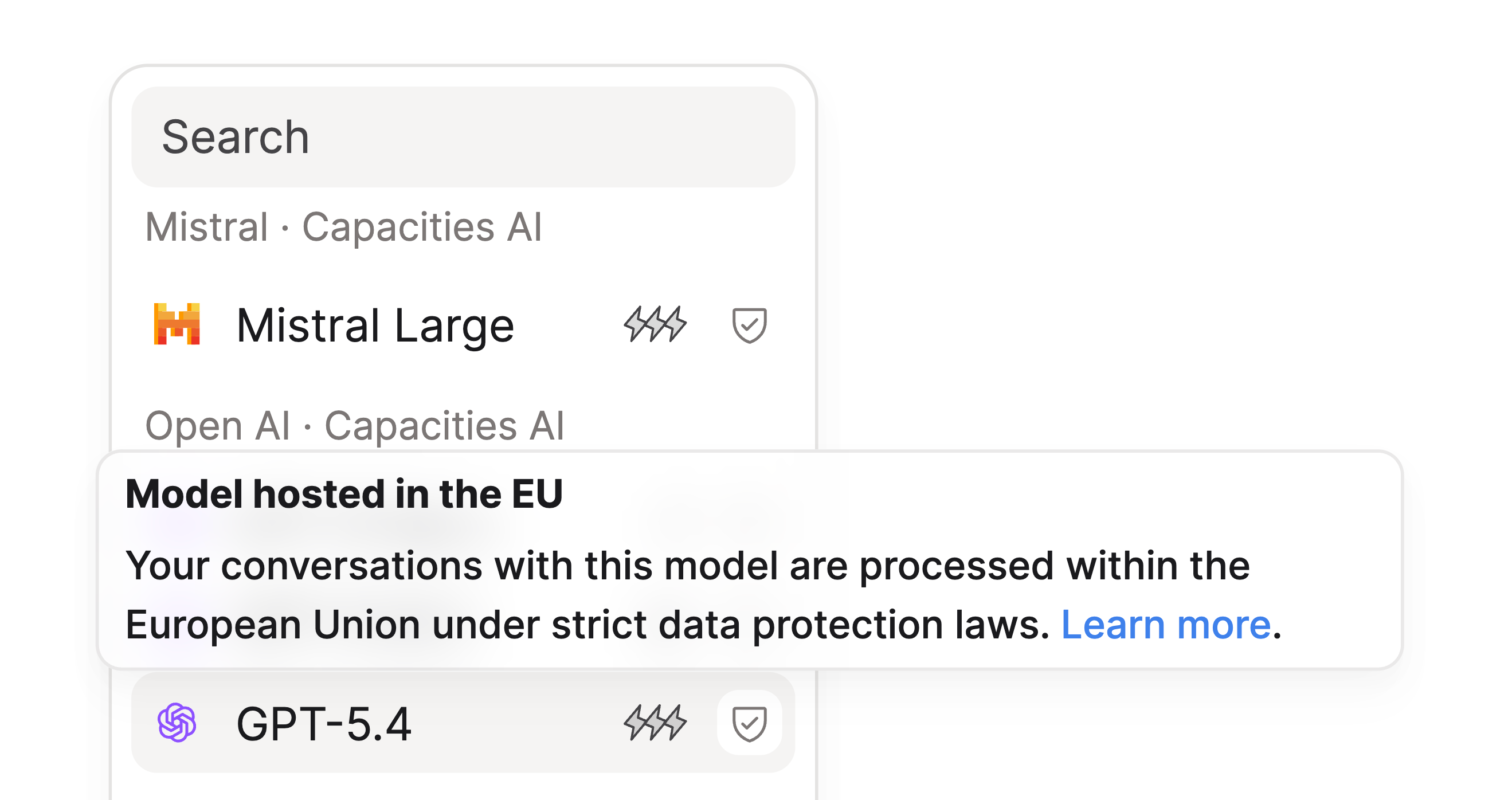
- If a model is hosted entirely in the European Union, meaning that the cloud provider guarantees data won't leave the European Union when interacting with that model, it will be marked with a safe check icon in the model picker within the AI Chat:
- AI conversations held within Capacities are automatically stored as objects, so our data processing and data protection agreements apply to them just as they do to every other object stored in Capacities.
Pro+ and Believer+ add-ons
Pro and Believer subscribers receive a monthly AI budget that resets each billing cycle. The included budget is sized for trying AI features or very light monthly use.
If you want regular AI use, add Pro+ or Believer+ to your subscription. These add-ons unlock a significantly larger monthly AI budget. If you exhaust that budget before your billing cycle resets, you can purchase top-ups (including auto top-up) under Settings > Subscription & Billing. Top-ups require Plus and cover intensive months.
For how the AI budget, add-ons, and top-ups work, see Subscriptions and payments. See the pricing page for plan details and add-on pricing.
Providers for Capacities AI per feature
The following table lists the AI features in Capacities and which providers are used with Capacities AI (included with your subscription). Any data sent to these providers stays private: it is used only to generate a response and is never retained. See Capacities AI.
| Feature | Description | Capacities AI Provider |
|---|---|---|
| AI Chat | Chat with AI; optional context from blocks, objects, search, web search and read notes | Chosen in the Chat window |
| AI Panel | Quick actions on selected text (summarize, translate, improve writing, etc.) | Google Gemini |
| Ask AI command | Type a question in a block with “/Ask AI” and get a response below | Google Gemini |
| AI auto-tagging | AI suggests tags from your existing tags for an object | Google Gemini |
| AI collection selection | AI suggests collections from your existing collections for an object | Google Gemini |
| AI Property Auto-Fill | Auto-fill properties (text, description, object select, date, number) using AI | Google Gemini |
| Media analysis | Analyze media files and objects (images, weblinks, PDFs, audio) using AI | Google Gemini |
| AI image generation | Generate an image from a prompt in the Generate tab | Google Gemini |
The exact model names and versions used for Capacities AI are updated over time for quality, efficiency and performance. For the current default, see in-app settings and release notes.
Summary (quick reference)
- Opt-in – No AI data sharing unless you use AI features.
- No training, no storage – We use APIs with DPAs; your content is only processed to generate responses.
- Legal docs – Terms and Conditions, Privacy Policy, Data Processing Agreement.
- Control – Turn AI on or off per space, limit AI to selected spaces only, or disable it entirely. Expand your monthly AI budget with Pro+ or Believer+ when you need more capacity.
Ask a question! - The Docs Assistant knows everything about the documentation, and the ideas and feature requests from other users.
Create a ticket on our feedback board. - Let us know if you have an idea for a feature, improvement or think there is something missing.
Request additions to the documentation. - If your questions are not getting answered, let us know and we will extend the documentation.